


SpaceThinker
Collection
Test Time Compute for Quantitative Spatial Reasoning using synthetic reasoning traces from 3D scene graphs • 7 items • Updated • 2


SpaceThinker-Qwen2.5VL-3B is a thinking/reasoning multimodal/vision-language model (VLM) trained to enhance spatial reasoning with test-time compute by fine-tuning
UCSC-VLAA/VLAA-Thinker-Qwen2.5VL-3B on synthetic reasoning traces generated by the VQASynth pipeline.
Qwen2.5-VL-3BUCSC-VLAA/VLAA-Thinker-Qwen2.5VL-3BCheck out the SpaceThinker collection
Strong quantitative spatial reasoning is critical for embodied AI applications demanding the ability to plan and navigate a 3D space, such as robotics and drones. SpaceThinker improves capabilities using test-time compute, trained with samples which ground the final response on a consistent explanation of a collection of scene observations.
Consider the following sample images/prompts for visual QA of SpaceThinker-Qwen2.5VL-3B
 |
 |
 |
|---|---|---|
| Prompt: How far is the man in the red hat from the pallet of boxes in feet? | Prompt: How far is the Goal from the penalty taker in this image? | Prompt: Approximately how many meters apart are the chair and bookshelf? |
| Reasoning: To determine how far the man in the red hat is from the pallet of boxes, I need to consider the spatial arrangement in the warehouse. The man is walking on the floor, and there's a visible gap between him and the pallet. First, I'll estimate the size of the pallet. A standard pallet is typically around 4 feet wide and 8 feet long. Given that the man is standing near the edge of the pallet, he might be about 2–3 feet away from the front edge of the pallet. Next, I'll consider the distance from the pallet to the man. The man appears to be walking along the aisle, which seems to be about 6–7 feet wide. If he is standing at the edge of the pallet, he would likely be about 2–3 feet from the front edge of the pallet. Combining these observations, the man in the red hat is approximately 2–3 feet from the pallet of boxes. | Reasoning: First, I observe the scene where a player in a red uniform stands near the goal. The goal itself is a standard soccer goalpost, which typically extends 2.5 meters beyond the line of the goalposts. The player appears to be standing close to the goal, but not directly at the goal line. To estimate the distance, I consider that the player's position relative to the goal suggests he is likely standing closer than 2.5 meters away. Given the typical setup of a penalty kick scenario, the player would be positioned further back from the goal than the goal itself. By visual estimation, the player seems to be standing approximately 10–15 meters from the goal. This range aligns with the common distance for a penalty kick, considering the player's stance and the goal's structure. Thus, the distance from the goal to the penalty taker is likely around 10–15 meters. | Reasoning: To determine the distance between the chair and the bookshelf, I'll consider the typical dimensions of these objects. A standard office chair is around 60–70 cm tall, and a bookshelf can be anywhere from 1.2 to 1.8 meters tall. Given that the chair is likely placed on a desk or floor level, the height difference between the chair and the top of the bookshelf would be approximately 1 meter. Assuming the bookshelf is at least 1 meter high, and the chair is at ground level, the vertical distance between them is indeed 1 meter. The horizontal distance might vary depending on the layout, but given the room's dimensions and the placement of the chair relative to the bookshelf, the total distance between the chair and the top of the bookshelf is likely around 1 meter. Therefore, the chair and bookshelf are approximately 1 meter apart. |
| Answer: 2–3 feet | Answer: 10–15 meters | Answer: 1 meter |
SpaceThinker demonstrates grounded, quantitative spatial reasoning—inferring accurate distances, interpreting 3D scene context, and formatting open-ended answers precisely by integrating visual cues, real-world object priors, and human-centric spatial logic.
Read more about using test-time compute here for enhanced multimodal quantitative spatial reasoning.
Try the SpaceThinker Space
To launch with ollama, run:
ollama run hf.co/remyxai/SpaceThinker-Qwen2.5VL-3B:latest
or
ollama run remyxai/spacethinker
To run locally with llama.cpp, install and build this branch and download the .gguf weights here
./llama-qwen2vl-cli -m spacethinker-qwen2.5VL-3B-F16.gguf
--mmproj spacethinker-qwen2.5vl-3b-vision.gguf
--image images/example_1.jpg --threads 24 -ngl 9
-p "Does the man in blue shirt working have a greater \\
height compared to the wooden pallet with boxes on floor?"
Run using llama.cpp in colab

Run locally using Transformers
import torch
from PIL import Image
from transformers import Qwen2_5_VLForConditionalGeneration, AutoProcessor
import requests
from io import BytesIO

# Configuration
model_id = "remyxai/SpaceThinker-Qwen2.5VL-3B"
image_path = "images/example_1.jpg"  # or local path
prompt = "What can you infer from this image about the environment?"
system_message = (
  "You are VL-Thinking 🤔, a helpful assistant with excellent reasoning ability. "
  "You should first think about the reasoning process and then provide the answer. "
  "Use <think>...</think> and <answer>...</answer> tags."
)

# Load model and processor
model = Qwen2_5_VLForConditionalGeneration.from_pretrained(
    model_id, device_map="auto", torch_dtype=torch.bfloat16
)
processor = AutoProcessor.from_pretrained(model_id)

# Load and preprocess image
if image_path.startswith("http"):
    image = Image.open(BytesIO(requests.get(image_path).content)).convert("RGB")
else:
    image = Image.open(image_path).convert("RGB")
if image.width > 512:
    ratio = image.height / image.width
    image = image.resize((512, int(512 * ratio)), Image.Resampling.LANCZOS)

# Format input
chat = [
    {"role": "system", "content": [{"type": "text", "text": system_message}]},
    {"role": "user", "content": [{"type": "image", "image": image},
                                {"type": "text", "text": prompt}]}
]
text_input = processor.apply_chat_template(chat, tokenize=False,
                                                  add_generation_prompt=True)

# Tokenize
inputs = processor(text=[text_input], images=[image],
                                      return_tensors="pt").to("cuda")

# Generate response
generated_ids = model.generate(**inputs, max_new_tokens=1024)
output = processor.batch_decode(generated_ids, skip_special_tokens=True)[0]

print("Response:\n", output)
The SpaceThinker dataset includes over 12K samples synthesized using VQASynth on a subset of images in the localized narratives split of the cauldron. SpaceThinker is formatted similar to the Llama-Nemotron-Post-Training-Dataset-v1 to toggle reasoning.
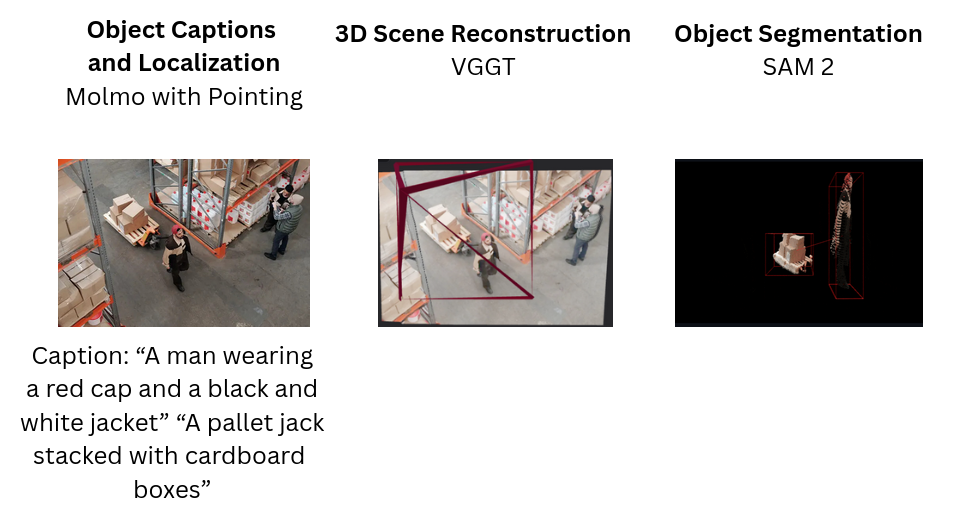
The model builds upon the ideas from SpatialVLM (Chen et al., 2024), introducing synthetic reasoning traces grounded on a 3D scene reconstruction pipeline using Molmo, VGGT, SAM2.
Dataset Summary
PEFT Configuration
Reproduce LoRA SFT training with included script:
python train.py
Wandb logs available here.
See how SpaceThinker compares on OmniSpatial - dynamic reasoning, complex spatial logic, spatial interaction, and perspective-taking.

Evaluate Spatial Reasoning with the SpatialScore Benchmark.

Evaluate SpaceThinker on the SpatialScore benchmarks for general spatial reasoning in the following colab notebook:
The following chart compares performance between SpaceThinker and SpaceQwen on the SpatialScore benchmarks sources.

Find the full summary of the results here.
SpaceThinker shines on the SpatialScore-Hard split:
| Model | Overall | Count. | Obj-Loc. | Pos-Rel. | Dist. | Obj-Prop. | Cam.&IT. | Tracking | Others |
|---|---|---|---|---|---|---|---|---|---|
| SpaceOm | 18.83 | 17.11 | 12.57 | 21.50 | 23.66 | 31.94 | 18.86 | 14.79 | 9.14 |
| 🧠 SpaceThinker | 19.47 | 17.82 | 12.57 | 21.50 | 25.37 | 30.23 | 22.86 | 14.79 | 9.71 |
| SpaceQwen2.5VL-3B | 17.21 | 20.42 | 18.86 | 27.10 | 6.86 | 12.57 | 8.57 | 23.08 | 18.86 |
| SpatialBot-Phi2-3B | 19.87 | 19.72 | 27.59 | 25.23 | 8.00 | 23.43 | 13.71 | 17.16 | 22.86 |
| Kimi-VL-3B | 16.29 | 12.68 | 18.86 | 12.62 | 17.71 | 22.29 | 18.86 | 11.83 | 15.43 |
| Kimi-VL-3B-Thinking | 26.36 | 19.72 | 28.00 | 38.79 | 27.43 | 32.57 | 14.86 | 18.34 | 26.86 |
| Qwen2.5-VL-3B | 16.86 | 18.31 | 7.43 | 16.82 | 19.43 | 31.43 | 15.43 | 14.79 | 11.43 |
| InternVL2.5-4B | 13.71 | 6.34 | 21.71 | 15.42 | 14.86 | 12.00 | 16.00 | 12.43 | 9.14 |
See all results for SpatialScore-Hard.
| Model | Overall | EQ | SQ | SA | OO | OS | EP | FR | SP | Source |
|---|---|---|---|---|---|---|---|---|---|---|
| InternVL2.5-4B | 36.01 | 34.30 | 34.40 | 43.60 | 44.40 | 16.50 | 31.10 | 50.10 | 33.70 | Table |
| 🧠SpaceThinker | 32.72 | 32.73 | 24.81 | 47.26 | 50.33 | 33.63 | 9.25 | 37.54 | 26.25 | GPT Eval |
| SpaceOm | 32.32 | 32.47 | 24.81 | 47.63 | 50.00 | 32.52 | 9.12 | 37.04 | 25.00 | GPT Eval |
| SpaceQwen | 31.98 | 31.19 | 25.89 | 41.61 | 51.98 | 35.18 | 10.97 | 36.54 | 22.50 | GPT Eval |
| Qwen2.5-VL-3B-Instruct | 30.00 | 31.70 | 45.50 | 39.00 | 43.00 | 25.30 | 11.50 | 22.80 | 21.20 | Table |
Legend:
ℹ️ Note: Scores for SpaceQwen, SpaceThinker, SpaceOm are generated via
gpt_eval_scoreon single-choice (*-single) versions of the SpaCE-10 benchmark tasks. Other entries reflect leaderboard accuracy scores from the official SpaCE-10 evaluation table.
Read more about the SpaCE-10 benchmark or see results here
| Model | SpaceThinker-Qwen2.5VL-3B | gpt-4o | gemini-2.5-pro-preview-03-25 |
|---|---|---|---|
| QSpatial++ Predictions |  |
 |
 |
| Colab Notebook | |
|
|
| Success Rate (%) ↑ | 55 | 43 | 52 |
| Samples Completed ↑ | 99 / 100 | 95 / 100 | 99 / 100 |
| sMAPE (%) ↓ | 66 | 71 | 62 |
Try distance estimation focusing on Q-Spatial-Bench in the colab notebook here:
The Q-Spatial-Bench dataset includes hundreds of VQA samples designed to evaluate quantitative spatial reasoning of VLMs with high-precision.

Using the Colab notebook we evaluate SpaceThinker on the QSpatial++ split under two conditions:
Default System Prompt:
Prompting for step-by-step reasoning using the spatial prompt from Q-Spatial-Bench:
Using the spatial prompt improves the number of correct answers and overall accuracy rate while improving the task completion rate.
Updating the comparison from Q-Spatial-Bench project page, the SpaceThinker-Qwen2.5-VL-3B VLM using the SpatialPrompt for step-by-step reasoning performs on par with larger, closed, frontier API providers.
The following chart makes further comparisons to assess prompt sensitivity by evaluating w/o the benefit of the optimized step-by-step instructions. This comparison helps to quantify the effect of reasoning versus non-reasoning models as well as that of SFT by LoRA with synthetic spatial reasoning data.

Consider the extended comparisons here sweeping additional model sizes and architectures.
Users are encouraged to evaluate outputs critically and consider fine-tuning for domain-specific safety and performance. Distances estimated using autoregressive transformers may help in higher-order reasoning for planning and behavior but may not be suitable replacements for measurements taken with high-precision sensors, calibrated stereo vision systems, or specialist monocular depth estimation models capable of more accurate, pixel-wise predictions and real-time performance.

@article{chen2024spatialvlm,
  title = {SpatialVLM: Endowing Vision-Language Models with Spatial Reasoning Capabilities},
  author = {Chen, Boyuan and Xu, Zhuo and Kirmani, Sean and Ichter, Brian and Driess, Danny and Florence, Pete and Sadigh, Dorsa and Guibas, Leonidas and Xia, Fei},
  journal = {arXiv preprint arXiv:2401.12168},
  year = {2024},
  url = {https://arxiv.org/abs/2401.12168},
}

@misc{qwen2.5-VL,
  title = {Qwen2.5-VL},
  url = {https://qwenlm.github.io/blog/qwen2.5-vl/},
  author = {Qwen Team},
  month = {January},
  year = {2025}
}

@misc{vl-thinking2025,
  title={SFT or RL? An Early Investigation into Training R1-Like Reasoning Large Vision-Language Models },
  author={Hardy Chen and Haoqin Tu and Fali Wang and Hui Liu and Xianfeng Tang and Xinya Du and Yuyin Zhou and Cihang Xie},
  year = {2025},
  publisher = {GitHub},
  journal = {GitHub repository},
  howpublished = {\url{https://github.com/UCSC-VLAA/VLAA-Thinking}},
}

@inproceedings{
  liaos2024reasoning,
  title={Reasoning Paths with Reference Objects Elicit Quantitative Spatial Reasoning in Large Vision-Language Models},
  author={Yuan-Hong Liao and Rafid Mahmood and Sanja Fidler and David Acuna},
  booktitle={The 2024 Conference on Empirical Methods in Natural Language Processing},
  year={2024},
  url={https://arxiv.org/abs/2409.09788},
}

@article{wu2025spatialscore,
    author    = {Wu, Haoning and Huang, Xiao and Chen, Yaohui and Zhang, Ya and Wang, Yanfeng and Xie, Weidi},
    title     = {SpatialScore: Towards Unified Evaluation for Multimodal Spatial Understanding},
    journal   = {arXiv preprint arXiv:2505.17012},
    year      = {2025},
}

@article{omnispatial25,
  title   = {OmniSpatial: Towards Comprehensive Spatial Reasoning Benchmark for Vision Language Models},
  author  = {Mengdi Jia and Zekun Qi and Shaochen Zhang and Wenyao Zhang and Xinqiang Yu and Jiawei He and He Wang and Li Yi},
  journal = {arXiv preprint arXiv:2506.03135},
  year = {2025}
}